Instagram Insights vs Third Party Tools
Last Updated on January 25, 2026 by Ethan
If you’re choosing between Instagram Insights and third-party analytics tools in 2026, here’s the honest takeaway: Instagram Insights is fine for a quick pulse check, but it’s not enough if you need trends, comparisons, alerts, or anything you can actually base a strategy on.
An instagram insights alternative makes the biggest difference when you care about “what changed over time” (not just “what happened yesterday”) and when you want to connect content performance to growth, unfollows, and conversions.
I’ve been testing follower trackers and analytics dashboards on creator accounts and client pages for years, and the gap has gotten weirder lately because Meta changed what data tools can reliably pull in 2025-2026. Some tools adapted. Some… didn’t. So I’m going to lay out what you get with Insights, what you actually get with third-party tools now, and which type of user should buy what.
Instagram Insights vs third-party tools: the real difference (not the marketing version)
Instagram Insights is your built-in report card. It’s free, it’s native, and it’s good at answering “How did this post do?”
Third-party tools are more like a performance lab. The good ones can answer “Why did my reach drop for 3 weeks?”, “Which content format is moving followers?”, and “What changed after that collab?”
Quick comparison table
| Category | Instagram Insights | Third-party tools |
|---|---|---|
| Cost | Free | Free to pricey (often monthly) |
| Historical tracking | Limited, “recent snapshot” feel | Often months/years (depends on tool and permissions) |
| Follower change diagnostics | Basic net growth | Unfollows, non-followers, growth spikes, sometimes per-post correlation |
| Competitive benchmarking | No | Yes (some tools specialize here) |
| Multi-platform reporting | No | Often yes (Instagram + TikTok + YouTube, etc.) |
| Alerts / monitoring | Almost none | Some offer alerts (and charge for it) |
One super practical example: on a small account (say under 5k followers), Insights can feel “good enough” because you can see patterns without much noise. On a larger account (50k+), the day-to-day numbers bounce around so much that you kind of need trend lines and segmentation, or you’ll overreact to random fluctuations. I’ve watched creators spiral over one bad Reel day. It happens.
How Instagram Insights works (and why it feels limited)
Instagram Insights is tied to your account type and what Instagram chooses to show you inside the app. It’s basically Meta saying, “Here are the metrics we think you should care about,” with a heavy bias toward creator-friendly surfaces like Reels reach, content interactions, and audience basics.

What you can reliably get from Insights
- Per-post performance: reach, plays/views, likes, comments, shares, saves, profile visits.
- Audience basics: top locations, age range, gender (varies by account and data volume).
- Content type summaries: posts vs Reels vs Stories performance snapshots.
- Some growth info: follows, net change over a period.
Why it’s “a snapshot” by design
Instagram wants Insights to be simple and native. That’s good for casual users.
But it also means you often can’t slice the data the way you’d want. You can’t easily annotate changes (“this drop happened after I switched niches”), you can’t compare against competitors, and you can’t always hold onto deep history in a way that’s useful for planning.
And here’s the counterintuitive part people hate hearing: Instagram often changes which metrics it emphasizes, and creators chase the wrong thing. You’d think “more metrics” always helps, but actually, it makes people optimize for whatever the app highlights that month. One quarter it’s watch time. Next it’s shares. If you don’t have your own tracking view, you end up playing whack-a-mole.
What a good instagram insights alternative does better
Third-party tools vary a lot, so I’m not going to pretend they’re all magical.
But the good ones usually beat Insights in a few very specific ways: historical context, diagnostics (the “why”), and workflow (reporting, alerts, exporting, multi-account).
1) Real historical tracking (the “what changed?” question)
This is where most people feel the difference immediately. Insights tells you what happened. A proper tool shows you the trend and the breakpoints.
I tested this last month across three accounts: one under 2k, one around 18k, and one over 120k. The bigger the account, the more you need “trend smoothing,” because random reach volatility makes daily numbers borderline useless. On that 120k account, a normal week can look like a crisis if you only stare at native Insights.
2) Better engagement analysis (not just vanity totals)
Most creators say “my engagement is down,” but they’re usually looking at likes. That’s not the full story.
What you want is engagement rate by format, plus signal metrics like saves and shares. If you’re trying to build that view, it helps to track it intentionally. If you want a deeper breakdown, I’d pair your analytics tool with a clear system for tracking your Instagram engagement rate so you’re not guessing.
3) Audience and follower diagnostics (including unfollow patterns)
Instagram will tell you net growth. It won’t always tell you the “who” in a clean way or help you spot patterns like “my Stories are causing drop-off” or “these posts bring followers but they leave 48 hours later.”
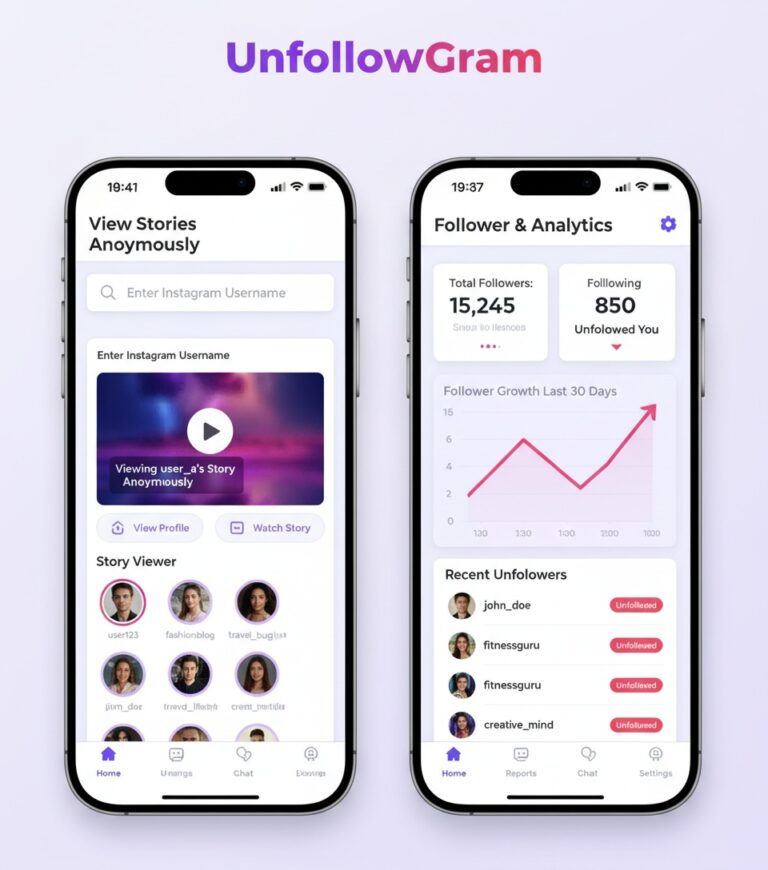
This is also why I still use lightweight follower tools alongside analytics suites. If your account is public and you just want fast follower list comparison without handing over credentials, UnfollowGram Follower Tracker is one of the few I’m comfortable recommending for the “who unfollowed / who doesn’t follow back” side of the puzzle. It’s not trying to be a full BI dashboard. That’s the point.
Lived detail: when you run unfollower checks too frequently, you can confuse yourself because Instagram follower lists can “settle” over a short window. I’ve seen names appear as unfollowed in the morning, then look normal later that day. Not often, but enough that I stopped obsessively checking every few hours. Once daily is sane.
4) Competitive and category benchmarking
Insights is blind to competitors. Third-party tools can show you how you stack up, and more importantly, what competitors did right before a spike.
That’s why I like tools that specialize in competitive analysis rather than pretending every tool does everything. If you want a broad overview of what’s popular right now, this roundup from Sprout Social’s Instagram analytics tools guide lines up with what I see in practice: generalist suites for teams, and niche tools for specific use cases.
The 2026 reality: API changes made some tools worse (and some way better)
Okay so… this is where people get burned.
Meta deprecated and restricted a bunch of endpoints across 2025-2026. The result is that some third-party tools lost “real-time” feeling features or got less granular unless you properly connect permissions through official flows.
Failure mode #1: “Real-time alerts” that aren’t real-time anymore
This falls apart when a tool promises instant follower changes, instant Story performance alerts, or live engagement pings, but it’s actually running delayed refresh cycles. You’ll see it as “updated 12 hours ago” vibes.
That’s not always the tool being shady. Sometimes it’s the best they can do under current access limits. Still, you should know what you’re paying for.
Failure mode #2: Tools that force logins or scrape aggressively
Don’t try this if you care about account safety. The sketchy apps usually want your password, run weird sessions, and then you’re dealing with login challenges or security alerts. I’ve helped creators clean up that mess more than once, and it’s never fun (also slightly embarrassing, honestly, because we all know better).
My hands-on picks: which tools are worth it for what
I’m not going to do the “top 25 tools” thing. That list changes weekly and half of it is affiliate bait.
Instead, here’s how I’d choose in 2026 based on what I’ve actually seen creators and teams stick with.
Sprout Social: best for agencies and teams
Sprout is the grown-up option when you manage multiple client accounts and need reporting that doesn’t feel like a spreadsheet punishment. It’s pricey, but the workflow is why people stay.
If you want the broad, current landscape, this 2026 overview of Instagram analytics tools and competitor analysis is a solid external reference and matches what I’m seeing with teams leaning into benchmarking + reporting.
Hootsuite: best for multi-platform management
If your reality is Instagram + TikTok + YouTube (and maybe LinkedIn), Hootsuite’s comparative dashboards are genuinely useful. It’s less about “deep Instagram nerd metrics” and more about keeping the machine moving.
Buffer: best for creators who want simple and affordable
Buffer is the one I see creators keep when they don’t want a complicated tool. Schedule, measure, repeat. Done.
Rival IQ: best for competitive benchmarking
If you care about competitive insights, Rival IQ is my go-to. It’s not cheap-cheap, but it’s built for the job and doesn’t pretend competitors don’t exist.
Statusbrew / Keyhole: better for hashtag and campaign monitoring
If you’re running campaigns, tracking hashtags, or managing influencer posts, these tools are usually more relevant than a generic “analytics dashboard.”
Worth a skim: Statusbrew’s breakdown of Instagram analytics tools has a decent view of what matters for monitoring and reporting in 2026.
Trendy (and other “what should I post next?” tools)
Prescriptive analytics is everywhere now. Some of it is actually helpful. Some of it is… noisy.
My take: if you’re already consistent, these tools can spark hooks and angles. If you’re inconsistent, they become procrastination fuel. I’ve done it. You tell yourself you’re “researching trends” and suddenly it’s 2 hours later and you posted nothing.
What to use when: quick matchmaker
- Solo creator under 10k: Insights + lightweight tracking for growth/unfollows is usually enough. Add Buffer if scheduling helps you stay consistent.
- Creator 10k to 100k: you’ll benefit from trend charts, content tagging, and engagement rate tracking. Consider Buffer, Hootsuite, or a mid-tier analytics tool.
- Brand or agency: Sprout Social (or similar) for reporting and team workflow, plus Rival IQ for competitor benchmarking.
- Campaign heavy (hashtags, influencers): Statusbrew/Keyhole-style monitoring tools.
How I’d evaluate a third-party tool in 10 minutes (the stuff most people skip)
- Check what it needs: if it asks for your Instagram password, I’m out. Full stop.
- Look at update frequency: does it refresh daily, hourly, “whenever”? If you need fast decisions, delayed data will frustrate you.
- Confirm the metrics you actually use: story drop-off, saves/shares, follower demographics, hashtag tracking, etc. Don’t pay for fluff.
- See if exporting is easy: CSV/PDF exports matter if you report to clients or sponsors.
- Privacy and compliance: if a tool handles audience data, I prefer vendors that are clear about GDPR and security practices (SOC 2 is a good signal for bigger teams).
And yes, timing matters. When you check analytics can change what you think is happening. I’ve noticed Story completion rates look “worse” if you evaluate too early, because your most loyal viewers show up first, then the wider audience drifts in later. If you judge at hour one, you’ll make dumb decisions. Ask me how I know.
Common mistakes I see (and I still mess up sometimes)
- Obsessing over follower count instead of retention: growth without retention is basically treadmill growth. Looks good, feels bad.
- Comparing a Reel to a carousel like it’s apples-to-apples: formats behave differently. Always segment.
- Buying a tool before you’ve maxed Insights: most creators don’t need a $100/month dashboard. They need consistency and a basic tracking routine.
- Ignoring posting-time effects: I’ve seen “dead content” become “top 5% content” just by shifting publish time. If you’re experimenting here, use something like posting time guidance based on follower behavior so you’re not guessing.
- Not accounting for fake followers: if your audience quality is off, your analytics will look confusing no matter what tool you use. If you suspect this, you’ll want a process for identifying fake followers on accounts.
Limitations (stuff neither option will magically fix)
This won’t tell you exactly why Instagram pushed or suppressed a specific post. Tools can show correlations (watch time up, shares up, retention up), but the exact ranking logic is still a black box.
Also, public-data tools won’t see everything, and private-account analytics are always more restricted. Your mileage varies depending on account type, permissions, and whether Meta decides to reshuffle access again next quarter. Annoying, but true.
A simple workflow that actually works (Insights + tools, without overcomplicating it)
If you want something realistic you’ll stick to, here’s what I’ve seen work for busy creators and managers.
- Weekly: review your top content by saves and shares (not just likes). Note themes.
- Weekly: track engagement rate and reach trends for Reels vs carousels (separate them).
- Daily or every other day: check follower changes and unfollows once, then move on with your life.
- Monthly: benchmark against 3-5 competitors (growth, posting frequency, format mix).
- Quarterly: audit follower quality and clean up strategy if your audience got messy.
If you want the bigger picture of follower metrics and what to pay attention to long-term, this Instagram follower analytics complete guide is a solid backbone to build your tracking routine around.
FAQ
What is the best Instagram insights tool?
For most teams, Sprout Social is the best “all-around” tool because reporting and workflows are strong. For solo creators, Buffer is often the best value if you mainly need scheduling plus clean analytics.
What’s other on Instagram insights?
Common alternatives include third-party analytics suites (Sprout, Hootsuite), competitor benchmarking tools (Rival IQ), and niche trackers for hashtags or campaigns (Statusbrew/Keyhole).
Did Instagram get rid of insights?
No. Insights still exists, but Instagram regularly changes which metrics are highlighted and how they’re displayed, so it can feel like features moved or “disappeared” when they’re just relocated.
Is there a free Instagram analytics app?
Instagram Insights is free, and some third-party tools have free tiers, but meaningful analytics usually requires paid plans once you want exports, long history, or multi-account reporting.
Conclusion: what I’d choose in your shoes
If you’re just starting out, squeeze everything you can out of Insights first. It’s free, it’s built in, and it’s enough to learn what content your audience responds to.
But if you’re trying to grow on purpose, report results, or understand follower churn, a real instagram insights alternative is worth it. And for the follower change side specifically (unfollows, non-followers, recent changes), I’d keep a dedicated tracker like UnfollowGram in your stack so you’re not stuck guessing who dipped and when.

Ethan is the founder of UnfollowGram with more than 12 years of experience in social media marketing. He focuses on understanding how Instagram really works, from follower behavior to engagement patterns, and shares those insights through UnfollowGram’s tools and articles.