
Instagram Unfollow Tracker App Reviews
Last Updated on January 14, 2026 by Ethan
Look, I was skeptical too. Every other week, there’s a new app claiming to track your Instagram unfollowers, and half of them are either scammy or straight-up dangerous for your account.
So I actually downloaded and tested the most popular ones. Spent a few weeks with each. Some surprised me. Others… not so much.
Here’s what I found.
⭐ 4.6 Stars • 5,400+ Reviews • No Password Required
Before We Start: The Safety Thing
I need to get this out of the way because it matters more than features.
Apps that ask for your Instagram password are a red flag. Always. Instagram’s terms are clear about this. They don’t want you sharing login credentials with third parties. When you do, you’re risking action blocks, temporary bans, or losing your account entirely.
The safe apps use a different approach. They analyze data you export from Instagram yourself. No password sharing. No direct access to your account. Much safer.
Keep this in mind as I go through these reviews.
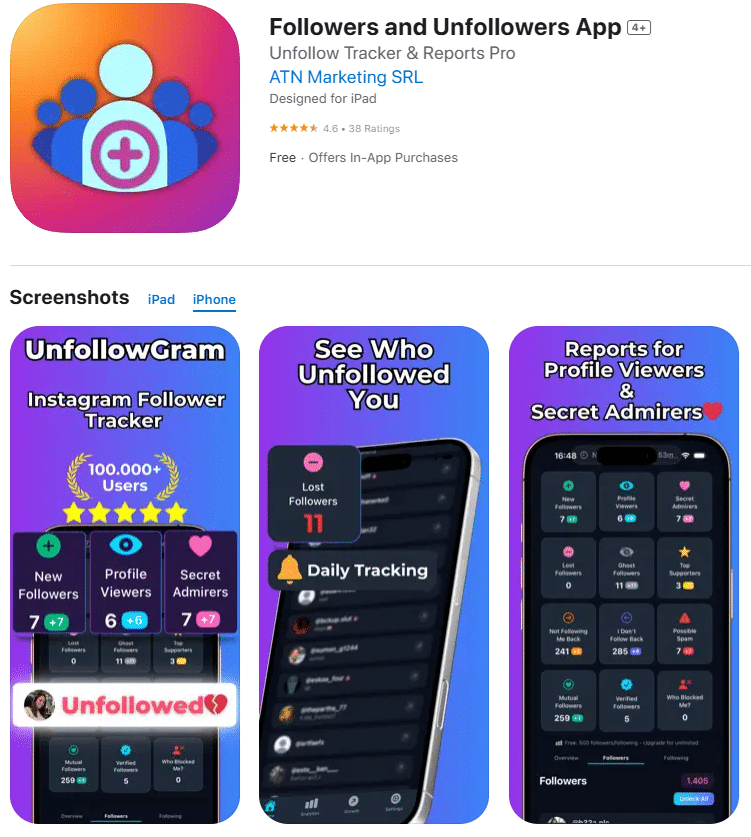
1. UnfollowGram
Starting with this one because it’s what I ended up sticking with after all my testing.
UnfollowGram works differently from most apps. You download your follower data from Instagram (takes like 2 minutes), upload it to the app, and it shows you exactly who doesn’t follow you back. Also tracks who unfollowed you over time if you keep using it.
What I liked: No password needed. Ever. The interface is clean. Results are fast, maybe 60 seconds. And it actually works on both iOS and Android, which is nice because I switch phones sometimes.
What could be better: You have to manually request your data from Instagram each time you want fresh results. It’s not automatic. But honestly, that’s the trade-off for being safe. I’d rather spend 2 extra minutes than risk my account.
The app has over 5,400 reviews with a 4.6 rating. In my experience, those numbers check out. It does what it says.
Verdict: The best option if you prioritize keeping your account safe. The extra step of downloading your data is worth it.
2. FollowMeter
This one’s been around for a while. Available on both platforms.
FollowMeter has a bunch of features packed in. Follower tracking, unfollower detection, post analytics, engagement stats. Looks impressive on paper.
My experience was mixed, though. The free version has SO many ads. Like, every other tap shows an ad. Gets annoying fast. And some of the features require you to connect your account in ways that made me uncomfortable.
I also noticed that some reviewers complained about accuracy issues. I couldn’t verify this myself, but it’s worth noting.
Verdict: Decent if you don’t mind ads. But the permission requests made me nervous.
3. Ghostgram
Interesting concept here. Ghostgram works completely offline. You export your data, it analyzes everything on your device, and nothing gets sent anywhere.
Privacy-focused people will like this approach. Your Instagram info never leaves your phone.
The downside? Interface feels a bit dated. Not as polished as UnfollowGram. And the features are more limited. Basically just shows non-followers and mutual followers. No historical tracking of who unfollowed you over time.
Verdict: Good for privacy purists. But lacks some features I find useful.
4. Unfollow Tracker: MyFollowers
This one had potential. Offers stuff like ghost follower analysis and profile viewer tracking.
But I ran into issues. The app crashed on me twice during my testing week. And the unfollower detection seemed off. It showed people as unfollowers who I’m pretty sure never followed me in the first place.
App store reviews are mixed. Some people love it, others report similar problems to mine. Seems inconsistent.
Verdict: Too buggy for me to recommend. Maybe they’ll fix it in updates.
5. InstaTracker
Newer app. Emphasizes keeping data on-device, which is good for privacy.
I only used this one for about a week, so take my review with that context. Seemed to work fine. The interface is decent. Shows followers, unfollowers, and most engaged users.
Didn’t blow me away, but didn’t disappoint either. Just… fine.
One thing I noticed: fewer reviews than the other apps. Being newer means less track record. It could be great, could have issues that haven’t surfaced yet.
Verdict: Worth watching. Need more time to judge properly.
What Actually Matters in These Apps
After testing all of these, here’s what I think matters most:
Safety first. Does it need your password? If yes, skip it. There are too many horror stories of people losing accounts. Not worth the risk. We wrote more about this in our unfollowers tracker guide.
Accuracy. Some apps show wrong information. That’s worse than no information, honestly. You’ll end up unfollowing people who do follow you, which is awkward.
Ease of use. If it takes 10 steps to see your non-followers, you won’t use it. Simple as that.
Historical tracking. Being able to see who unfollowed you SINCE your last check is really useful. Especially for tracking your follower growth over time.
The Apps I’d Avoid
Didn’t include these in my main reviews because I couldn’t even finish testing them. Either they required password login (automatic no from me) or had such bad reviews I didn’t want to risk it.
Some red flags to watch for:
- Asks for the Instagram password during setup
- Promises to auto-unfollow people for you
- Has tons of 5-star reviews, but they all sound fake
- Hasn’t been updated in over a year
- Requests way more permissions than necessary
Trust your gut. If something feels off about an app, just don’t install it.
My Recommendation
After all this testing? UnfollowGram is what I use regularly now.
Not because it’s perfect. The manual data export step is a bit tedious. But it’s the safest option I found, and safety matters more than convenience when we’re talking about your Instagram account.
It does everything I actually need: shows who doesn’t follow me back, tracks unfollowers over time, and never asks for my password. The follower tracker features are solid, too.
If you want to try it yourself, it’s free to download. Premium unlocks some extra stuf,f but the core functionality works without paying.
What About Mass Unfollowing?
Quick note since people always ask. These tracker apps show you WHO to unfollow. The actual unfollowing you do yourself through Instagram.
This is intentional. Apps that auto-unfollow people for you are the ones that get accounts banned. Instagram sees that as automation and doesn’t like it.
So yes, you’ll have to manually unfollow people one by one. It’s slower, but your account stays safe. We covered the safest way to mass unfollow in another post if you want details on pacing yourself.
Final Thoughts
The unfollow tracker app space is kind of a mess. Lots of sketchy options. A few good ones buried in there.
Do your research before installing anything. Check recent reviews, not just the star rating. Make sure they don’t need your password. And honestly, consider whether you even need these features before downloading random apps.
For most people, knowing who unfollowed you on Instagram is useful for cleaning up your following list and understanding your audience better. Just make sure you’re using a tool that won’t cause problems with your account.
If you want to see who doesn’t follow you back without any risk, check out our non-followers guide. Or if you’re curious about tracking other accounts, we have an Instagram profile viewer that works for public accounts.
Stay safe out there.

Ethan is the founder of UnfollowGram with more than 12 years of experience in social media marketing. He focuses on understanding how Instagram really works, from follower behavior to engagement patterns, and shares those insights through UnfollowGram’s tools and articles.





